Your first safe task
Watch AgentTx catch a mistake, undo it and guide your AI to the fix, with the exact messages the AI receives.
This walkthrough uses a small task that goes wrong on purpose, so you can see AgentTx at work. It works the same in every connected app.
The request
Paste this into your AI app:
Use the AgentTx tools for this task. Begin a transaction, save the customer id
"c-404" with kv.put, then create invoice "inv-1" for that customer with
record.insert (reference customer_id to the customers table).
If AgentTx rolls back, follow its hint, then commit the transaction.
The customer c-404 does not exist, so the invoice can't be created. The mistake comes from step 1 (a wrong id), but it only shows up at step 2.
What happens, step by step
1. The AI starts a transaction
The AI calls begin_transaction. AgentTx replies with a transaction_id and tells the AI to start at step 1.
2. Step 1 saves the customer id
run_step with kv.put succeeds. Nothing looks wrong yet.
3. Step 2 fails — and AgentTx rolls back
The invoice needs a customer that exists. Without AgentTx, the AI would see a long database error and might retry step 2 forever. With AgentTx, it gets this:
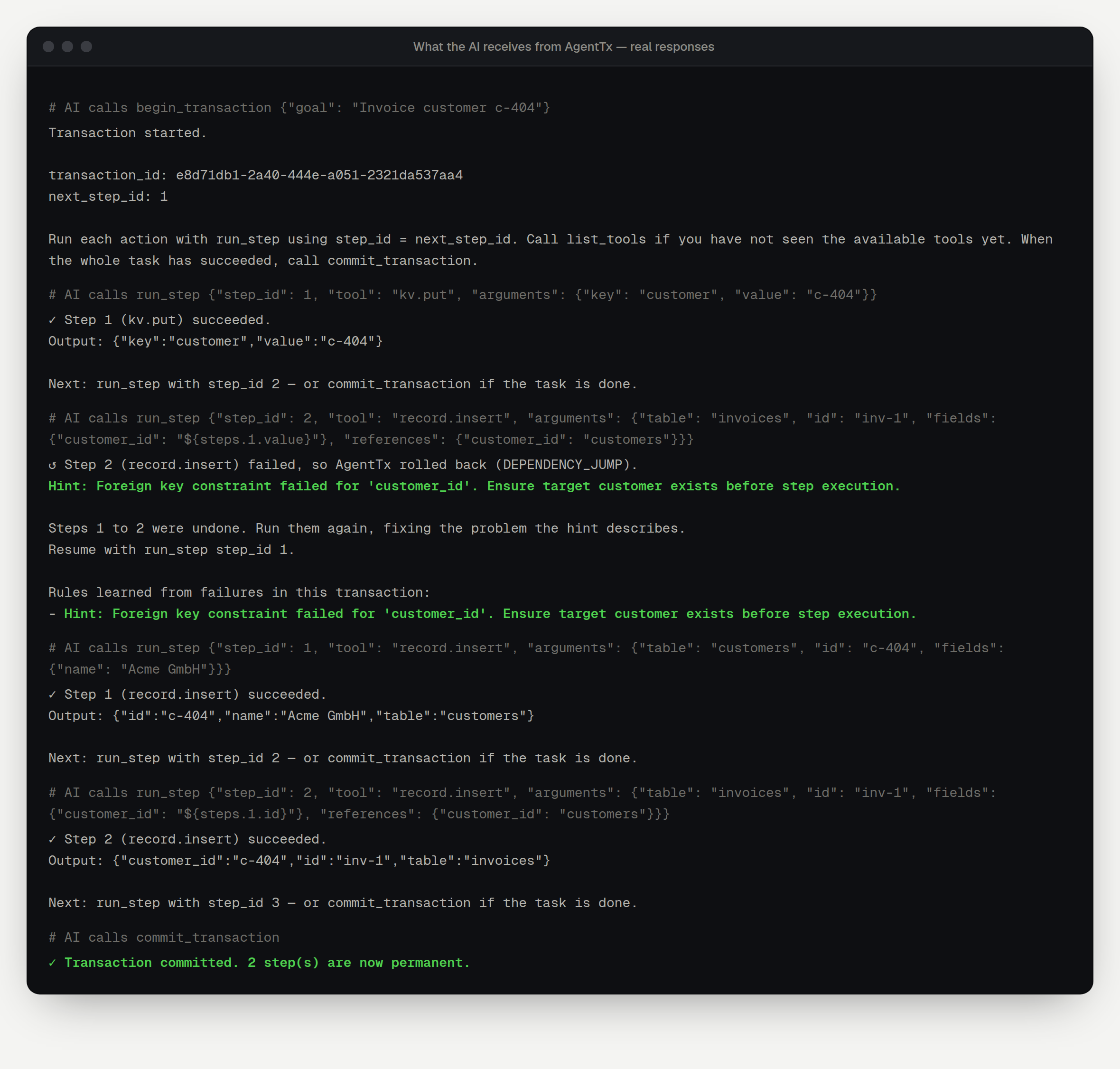
In plain words, AgentTx:
- Explained the error in one line: Foreign key constraint failed for 'customer_id'. Ensure target customer exists before step execution.
- Found the real cause. The bad value came from step 1, so it undid steps 1 and 2 (a dependency jump).
- Told the AI where to continue: Resume with run_step step_id 1.
4. The AI fixes the plan
Following the hint, the AI creates the customer first, then creates the invoice with the correct id. Both steps succeed.
5. The AI commits
commit_transaction makes the changes permanent. If there had been an email in the plan, it would be sent now, exactly once, and never for an attempt that failed.
Try it yourself: more requests
Files that clean up after themselves
Use AgentTx. Begin a transaction, write notes/plan.md with fs.write containing
"# Launch plan", then read a file called notes/missing.md with fs.read.
If a step fails, roll back the whole transaction and tell me what was undone.
The first write is undone when the transaction is rolled back. Check ~/.agenttx/workspace/notes: the file is gone.
Emails that wait for success
Use AgentTx. Begin a transaction, stage an email to team@example.com with
effect.stage saying "Report ready", then roll back the transaction.
Was the email sent?
The email is never sent, because it was staged and the transaction didn't commit.
Tips for good results
- Say "use the AgentTx tools" in your request. Otherwise the AI may use its own built-in tools, which AgentTx doesn't protect.
- Let the AI call
list_toolsfirst. It shows every available tool, with example arguments. - Always finish with
commit_transactionorrollback_transaction. Transactions left open are cancelled automatically after an hour.